Recover Forgotten SSO ID Rajasthan
Forgetting your SSO ID is a common issue faced by many users while accessing Rajasthan government services online. Since this single login is used for multiple portals, losing access can temporarily stop you from using important services like jobs, certificates, and schemes. However, the recovery process is simple and fully online.
The SSO Rajasthan system provides easy options to retrieve your lost ID using mobile number, email, or Jan Aadhaar verification. Users can quickly recover their account details through the official portal without visiting any office. This makes the system user-friendly and convenient for everyone.
Why Users Forget SSO ID
Many users forget their SSO ID due to inactivity, multiple accounts, or lack of proper record keeping. Sometimes changes in mobile number or email also cause login confusion.
- Long time inactive account
- Multiple IDs created by mistake
- Forgotten registration details
- Changed mobile number or email
- Not saving login credentials
- Weak memory of username
- Device change or reset
- Lack of written record storage
Step-by-Step Method to Recover Your Lost SSO ID
Recovering your SSO ID is simple through the official Rajasthan portal using verification options. You just need your registered details like mobile number, email, or Jan Aadhaar to get your ID back.
- Open official website: Visit https://sso.rajasthan.gov.in on your browser to start the recovery process safely and securely online.
- Go to login page: Click on the login option available on homepage to open account access and recovery features.
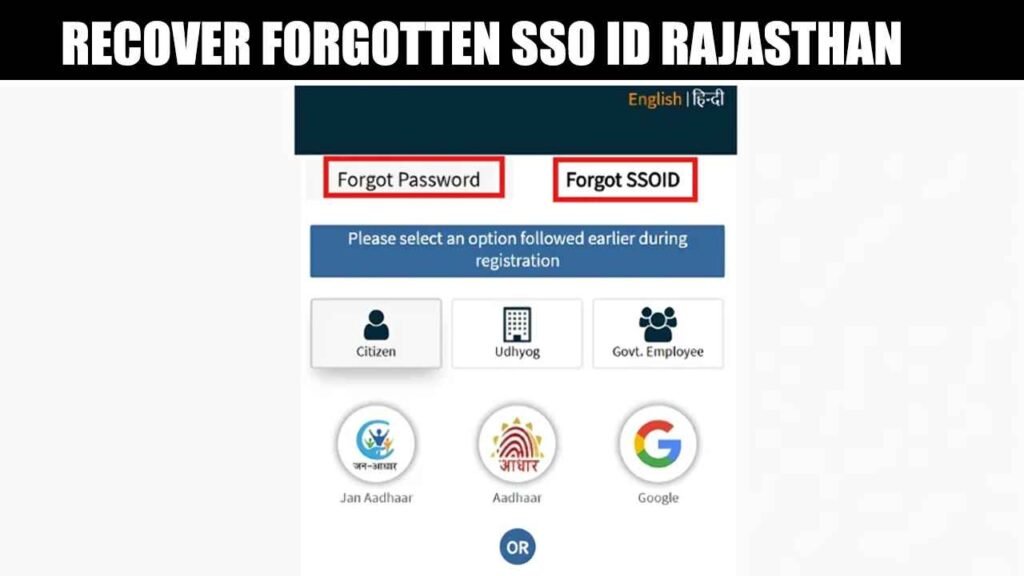
- Select forgot option: Click on “I forgot my Digital Identity (SSOID)” to start the recovery process easily.
- Choose recovery method: Select mobile number, email, or Jan Aadhaar option based on your registration details previously used.
- Enter required details: Provide correct registered information carefully to verify your identity and continue recovery process successfully online.
- Verify OTP code: Enter the OTP received on your mobile or email to confirm identity and proceed further.
- Receive SSO ID: After successful verification, your SSO ID will be sent to registered mobile number or email.
- Login again: Use recovered SSO ID to access your account and continue using government services without any issues.
Forgot SSO ID Using Mobile Number
Mobile number is one of the easiest ways to recover your SSO ID through OTP verification on the official portal.
- Open SSO portal and go to login page
- Click on “Forgot SSO ID” option
- Select mobile number verification method
- Enter your registered mobile number
- Verify OTP sent to your phone
- Receive your SSO ID via SMS
Forgot SSO ID Using Email
Email recovery helps users get back their SSO ID by verifying their registered email account securely.
- Go to SSO login page
- Select recovery option
- Choose email verification method
- Enter registered email ID
- Verify OTP or recovery link
- Get SSO ID in email inbox
Forgot SSO ID Using Jan Aadhaar
Jan Aadhaar method is useful for Rajasthan residents to recover SSO ID through family and identity verification.
- Select Citizen recovery option on portal
- Choose Jan Aadhaar method
- Enter Jan Aadhaar number
- Verify family details carefully
- Complete OTP verification process
- Get SSO ID details successfully
Common Problems & Solutions
Users may face some common issues while recovering their SSO ID, but most problems can be easily fixed online. Proper verification and correct details help solve these errors quickly and smoothly.
| OTP not received | Check mobile network, wait a few minutes, or request OTP again. |
| Wrong mobile number | Enter the same number used during registration for recovery process. |
| Email not working | Check inbox and spam folder or use correct registered email ID. |
| Jan Aadhaar mismatch | Verify family details carefully and re-enter correct Aadhaar information. |
| SSO ID not found | Try another recovery method or contact official support team. |
| Slow website | Refresh page or use a different updated browser for better access. |
| Multiple attempts failed | Wait for some time and try again with correct information. |
| No recovery response | Contact helpdesk with valid identity proof for manual assistance. |
Contact Support
- Website: https://sso.rajasthan.gov.in
- Email: helpdesk.sso@rajasthan.gov.in
- Phone: 0141-2925554
- Helpline: 181
Frequently Asked Questions (FAQs)
Final Thoughts
Recovering a forgotten SSO ID is a simple and quick process through the official Rajasthan portal. Users can easily get their login details using mobile number, email, or Jan Aadhaar verification. This system ensures secure access without any difficulty or delay. Overall, it helps users continue using government services smoothly and without interruption.